
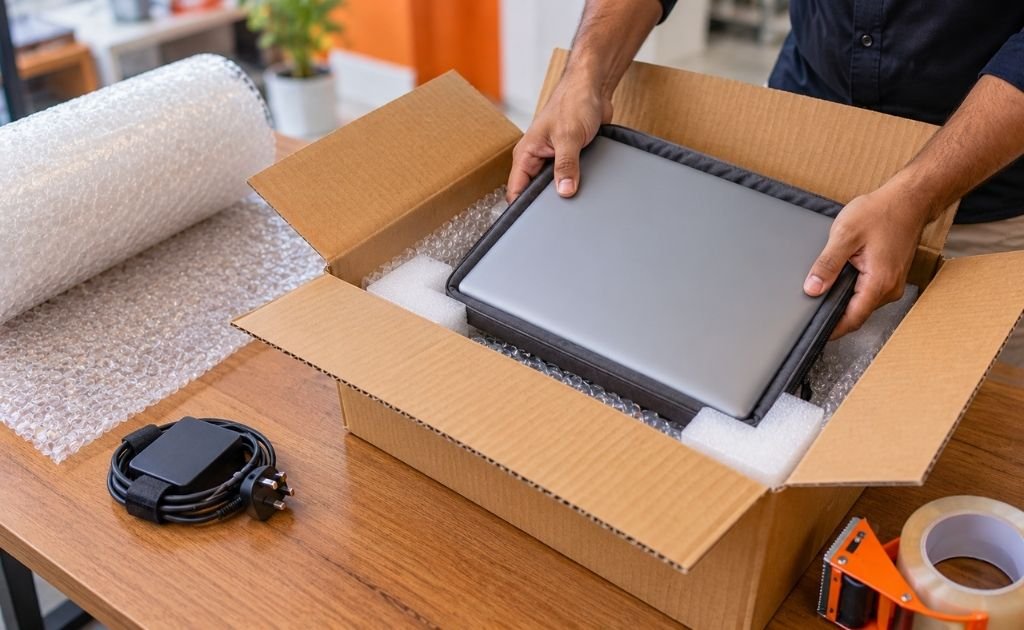

Yes, you can send a laptop by courier, within India and to many countries abroad. A good laptop courier service does three things before it takes your parcel: it confirms that the laptop and its battery are accepted on your route, it makes sure the packing can survive the journey, and it gives you a price based on the packed box, not a guess.
A laptop is not an ordinary parcel. It is fragile, usually valuable, holds your data and contains a lithium-ion battery that air carriers treat as regulated cargo. This guide walks through each decision in the order you will face it.
Table of Contents
Can You Send a Laptop by Courier?
In most cases, yes. Laptops are sent by courier every day: by students moving cities, employees returning office equipment, families sending a device to someone abroad and people posting a laptop for repair.
What changes from one shipment to the next is the condition attached to the yes:
- The carrier and service. Some counters accept laptops only on surface (road) services. Others accept them by air under battery rules.
- The route. A laptop going from Chennai to Bengaluru is a different shipment from one going to Toronto.
- The battery. A healthy battery fitted inside the laptop is the simplest case. A swollen, damaged or loose battery is not.
- The value. Higher-value laptops may need an invoice, a declaration or extra cover.
So the first step is not buying bubble wrap. It is telling the courier exactly what you are sending and asking whether it is accepted on your route.
The Battery Question: What Couriers Need to Know
Every modern laptop runs on a lithium-ion battery. These batteries are safe in normal use, but they can overheat if damaged or short-circuited, which is why airlines regulate them. The IATA guidance on lithium batteries explains that whether a battery can travel by air depends on its configuration and its watt-hour rating.
For a sender, four points matter.
Keep the battery inside the laptop
A battery installed in the device is the configuration carriers accept most readily. Spare batteries and power banks are treated more strictly, so do not drop one into the box without asking first.
Know the watt-hour (Wh) rating
It is printed on the battery or the underside of the laptop, or listed in the specifications. Most laptop batteries are rated below 100 Wh, the level under which carriers apply the simpler set of air rules. Large gaming and workstation models can sit close to that line.
Be honest about battery condition
DHL Express states in its lithium battery rules that damaged, defective or recalled batteries are not permitted on aircraft, and that such a battery must be removed from a laptop before the shipment can be accepted. If the laptop’s base is bulging or the trackpad has lifted, get the battery checked before you ship.
Declare it
The same DHL page makes the shipper legally responsible for compliance and limits lithium battery shipments to pre-approved account holders. Describe the parcel as a laptop with an installed lithium-ion battery. Never label it “documents” or “gift items” to get it past a counter.
If a courier refuses a laptop on an air service, that is the carrier applying its own policy, not an error. Ask what it does accept: often a surface service, or air through a carrier account set up for battery shipments. The same acceptance-first approach applies to other regulated items, as our guide on sending perfume by courier explains.
Domestic and International Laptop Shipping Compared
| Within India | From India to another country | |
| Usual transport | Road or air, depending on the carrier and service | Air |
| Battery checks | Depend on the carrier’s policy and mode | Air-transport battery rules apply; the carrier may ask for the model and Wh rating |
| Paperwork | Consignment note; sometimes an invoice or a declaration of value | Invoice or declaration, sender ID, customs declaration with a true description and value |
| Extra costs | Fuel surcharge and GST on freight | Destination duties and taxes may be charged to the receiver |
| Who decides acceptance | The courier | The carrier, Indian customs and the destination country’s import rules |
Before You Pack: Back Up, Sign Out, Record
Packing protects the machine. These steps protect everything else.
- Back up your data. Carriers do not compensate for lost files. FedEx’s guide to shipping computers tells senders to back up before shipping for exactly this reason.
- Sign out or lock down. If the laptop is going to a buyer or a repair centre, sign out of your accounts. If it is going to family, a strong login password and disk encryption are enough.
- Photograph it. Take clear pictures of the lid, screen, keyboard, base and serial number, then photograph the packed box. These are your proof of condition if you ever need to claim.
- Note the serial number and keep the purchase invoice handy.
- Shut it down completely. Sleep mode is not off. A laptop that wakes inside a sealed box generates heat.

How to Pack a Laptop for Courier
The original manufacturer’s box with its foam inserts is the best inner packaging you can use. If you no longer have it, build the same protection yourself.
- Protect the screen. Place a thin sheet of foam or soft cloth between the keyboard and the screen, then close the lid.
- Add a sleeve or anti-static bag. A padded laptop sleeve is ideal. This layer guards against scratches and static.
- Wrap in bubble wrap. Use several layers, paying attention to the corners, and tape the wrap so it cannot unravel.
- Choose a strong, right-sized carton. A double-wall corrugated box that leaves room for about 5 cm of cushioning on all six sides works well. Too large a box costs more and lets the laptop move.
- Cushion the base, then centre the laptop. Fill around it with foam, air pillows or more bubble wrap. Avoid crushed newspaper, which flattens in transit.
- Do the shake test. Close the flaps and shake gently. If anything shifts, add more fill. Do not pack so tightly that the box presses on the lid.
- Seal every seam. Run strong packing tape along the centre seam and both edge seams, top and bottom, in an H shape.
- Label clearly. Put names, full addresses and phone numbers for both sender and receiver on top of the box, and remove any old labels.
Packing the charger and accessories
Wrap the charger, mouse and cables separately and place them beside the laptop, never on top of the lid or screen. A hard charger brick pressed against the lid is a common cause of cracked screens. If there is no safe space, send accessories in a small second box.
For a high-value laptop, double boxing (the packed carton placed inside a larger one with cushioning between) gives a further margin. Our fragile courier service in Chennai page describes this method for breakable items.
Laptop Courier Charges: What Decides the Price
There is no single rate for couriering a laptop, and any article that gives you one figure is guessing at your route. Laptop courier charges depend on:
- Origin and destination: the PIN codes within India, or the country abroad.
- Service speed: express air costs more than surface.
- Chargeable weight: explained below.
- Declared value and cover: optional protection is usually priced as a percentage of the value.
- Packing: if the courier supplies materials or packs for you.
- Surcharges and taxes: fuel surcharge, remote-area fees and GST on the freight.
- Duties abroad: for international parcels, import duty and tax at the destination.
Actual weight versus volumetric weight
Couriers bill on whichever is higher: what the box weighs on a scale, or what its size works out to. A common formula for express services is:
Length × width × height (in cm) ÷ 5,000 = volumetric weight in kg
Take a 2 kg laptop packed in a 45 × 35 × 12 cm carton. The packed box may weigh about 2.6 kg, but its volumetric weight is 45 × 35 × 12 ÷ 5,000 = 3.78 kg, so it is billed as roughly a 4 kg parcel. The divisor differs between carriers and services, so treat this as an illustration.
The lesson: pack snugly. Cushioning protects the laptop; empty space only adds to the bill.
Declared Value, Cover and Claims
A laptop is not automatically insured because you paid for a courier. A carrier’s standard liability is normally limited, often to a small fixed amount or a formula based on weight. FedEx, for example, says on its computer-shipping page that it does not provide insurance and that declaring a value raises its limit of liability.
Before you book, ask:
- What is the standard liability for this service?
- Is additional cover available for my declared value, and what does it cost?
- What is excluded? Self-packed items, used electronics and internal damage with no visible damage to the box are common exclusions.
- How quickly must damage be reported, and what proof is needed?
Declare the laptop’s real value. Under-declaring to save a small fee reduces what you can recover, and on international parcels it is a customs offence.
Within India, GST rules require an e-way bill for consignments valued above ₹50,000, with an exemption for used personal and household effects. In practice a courier may still ask for a copy of the invoice or a signed declaration for an expensive laptop, so keep one ready.

Booking, Tracking and Delivery Day
At booking, check that the consignment note shows the correct description, declared value, weight and both phone numbers. Keep the receipt and the tracking or airway bill number.
In transit, share the tracking number with the receiver. Delivery times depend on the route and service, so ask for an estimate for your booking and treat it as an estimate unless the service terms say otherwise.
On delivery, ask the receiver to:
- Look at the box before signing. If it is crushed, torn or re-taped, write that on the delivery record.
- Record a short video while opening the parcel.
- Switch the laptop on and check the screen, hinges, ports and charger.
- Report any problem to the courier straight away, with photos. Claim windows are often short.
Sending a Laptop Abroad From India
An international laptop courier involves three sets of rules: India’s export requirements, the carrier’s battery and acceptance rules, and the destination country’s import rules.
Keep these in mind:
- Say whether it is new or used, and personal or sold. A used personal laptop, a gift and a commercial sale are documented differently.
- Expect value limits on “gifts”. The Chennai Customs courier procedure caps personal gifts sent by courier at ₹25,000 per consignment and says all courier consignments are screened. Most laptops are worth more than that, so give the courier the real value and let them advise on the right clearance route.
- Tell the receiver about duties. Import duty and tax are set by the destination country and are usually collected from the receiver before delivery.
- Check destination restrictions. Some countries have their own rules for used electronics. A careful courier checks the route instead of assuming.
- Use proper packing. International parcels are handled more often and travel further.
Galaxy’s international courier service from Chennai page covers the general process for overseas parcels, and the international packing services page explains the packing support available.
Laptop Courier Service in Chennai: How Galaxy Can Help
Galaxy International Couriers has handled domestic and international parcels from Mylapore, Chennai since 2015, working with carriers including DHL, FedEx, UPS and Aramex. The team offers doorstep pickup, packing support and tracking through its domestic and international courier services.
Laptops are checked shipment by shipment. Acceptance, the available service and the price depend on your route, the laptop and its battery, so the team confirms these before booking instead of promising them in advance.
To get a clear answer quickly, share:
- Pickup and delivery PIN codes, or the destination country
- Laptop brand, model and approximate value
- Whether the battery is installed and in good condition
- Packed weight and box dimensions, if you have already packed it
- Whether it is a personal item, a gift or a sale
- When you need it delivered
Common Mistakes to Avoid
- Sending the laptop in its carry bag or sleeve alone, with no carton
- Placing the charger on top of the lid
- Using a box far larger than needed and paying for the empty space
- Leaving the laptop in sleep mode
- Describing the contents vaguely or wrongly to avoid questions
- Under-declaring the value
- Shipping a laptop with a swollen battery
- Skipping the backup and the photos
- Throwing away the booking receipt before the laptop has been checked at the other end
Laptop Pre-Shipment Checklist
- Courier has confirmed the laptop and battery are accepted on this route
- Data backed up; accounts signed out or device locked
- Photos taken of the laptop, serial number and packed box
- Laptop fully shut down
- Screen protected, laptop wrapped and cushioned on all six sides
- Charger and accessories wrapped separately
- Box passes the shake test and is sealed on every seam
- Sender and receiver details on the box
- Value declared truthfully; cover and exclusions understood
- Invoice or declaration ready if asked
- Tracking number saved and shared with the receiver
Frequently Asked Questions
Can I send a laptop by courier in India?
Yes. Many couriers carry laptops within India, though each sets its own conditions on the service (road or air), packing and declared value. Tell the courier it is a laptop and confirm acceptance for your route before you book.
Can a laptop be sent with its battery installed?
Usually, yes. A healthy battery fitted inside the laptop is the standard way to ship one. A damaged, swollen or recalled battery is a different matter: carriers such as DHL Express do not accept it for air transport.
How much does it cost to courier a laptop?
It depends on the route, service speed, the packed box’s chargeable weight, declared value and any packing or cover you add. Ask for a quote with your PIN codes or destination country and the box size.
Can I send the charger in the same parcel?
Yes. Wrap it separately and place it beside the laptop, not on the lid. Do not add spare batteries or power banks without checking with the courier first.
Is my laptop insured during courier delivery?
Not automatically. Standard carrier liability is limited. Ask what the limit is, whether extra cover is available for your declared value and what it excludes.
Can I send a laptop abroad from India?
Often, yes, through an express carrier that accepts devices with installed lithium-ion batteries. The carrier’s rules, Indian customs requirements and the destination country’s import rules all apply, and the receiver may have to pay duty.
How do I track my laptop shipment?
Use the tracking or airway bill number on your booking receipt on the carrier’s tracking page, or ask your courier for an update. Share the number with the receiver so someone is available on delivery day.
Ready to Send Your Laptop?
Send Galaxy courier your route, laptop model, approximate value and battery details. The team will confirm whether the shipment can be accepted, suggest suitable packing and share a quote for your route.